
A common use case for the Stat-Xplore API feature is creating Power BI dashboards with a live connection to the Stat-Xplore data. This means that these users have access to custom visualisations that stay up to date.
These pages are to support other interested users to take advantage of this feature.
Overview
Requirements
- Stat-Xplore API key
- Open Data .json text
- Power BI query template
Stat-Xplore API Key
For help getting your Stat-Xplore API Key look under the API Keys header guidance here: API Keys
Retrieving Open Data .json text
You will need the json text file with the schema of the data that you would like to connect to Power BI.
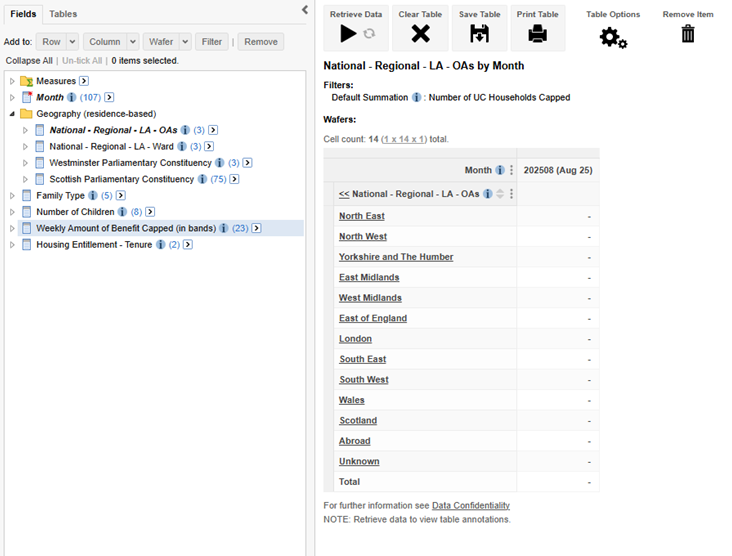
- Firstly, you will need to build the table with the data that you would like to be channelled into your dashboard. In these example images, you will see that we have used data from the Benefit Cap 'UC Point in Time Caseload' dataset. It is not necessary to create the same table to follow this example. Refer to All about Tables for help with building a table in Stat-Xplore.
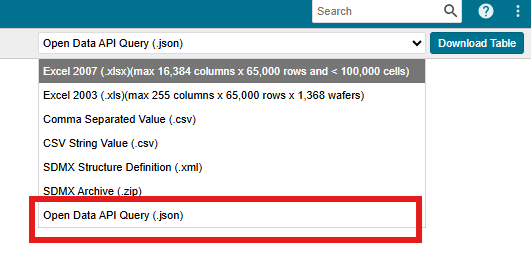
- In the top right corner, you will find a drop-down list from which you will need to select the Open Data API Query (.json) option
- Press download table.
- You will receive a text file which should be opened in a text editor such as notepad or notepad++ (do not use Microsoft Word as this may conflict with the Power BI query editor).
To keep this json text as a string in the Power BI query template, all the single quotation marks will need to be replaced with double quotation marks.
CTL-H and replace all single quotation marks (") with double quoation marks ("").
- The body of this text file is what you will need for the query template.

DAX Query Template
The query template below is what you will use in Power Query to source the data (Refer to next section for more step-by-step guidance for this bit). You will need to replace the highlighted sections. The formatting of text in Power Query will not matter.
- The body part of the template will contain the text from you json text file downloaded from Stat-Xplore.
- Your API Key will go between the quotes next to APIKey.
